
Absher Appointments Guide: How to Book an Appointment
Learn how to book, modify and cancel Absher appointments for Civil Affairs, Passports, Traffic, Police and other available services.
Log in to Absher, open the relevant appointment service, choose the government sector and service, select the available branch, date and time, then confirm your appointment.
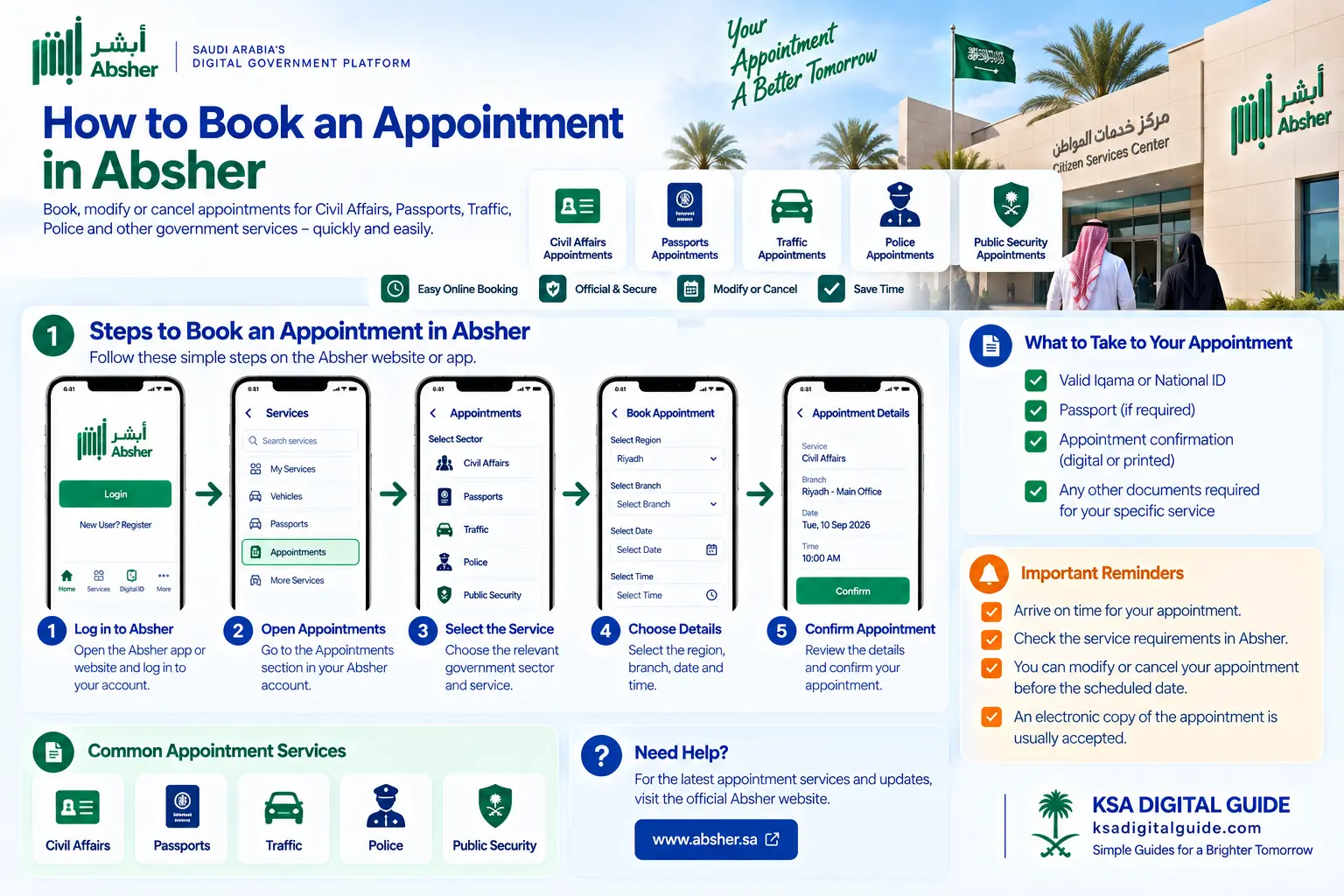
How to Book an Absher Appointment
The exact options can vary by government sector and service. Use the appointment service shown in your Absher account.
Not every appointment uses exactly the same menu. Follow the service-specific options shown by Absher.
Absher Appointment Services
Absher currently provides appointment services across several Ministry of Interior sectors. The available services depend on the selected department.
Book or modify an available Civil Affairs appointment and review the service requirements before your visit.
Schedule an appointment with the General Directorate of Passports for available services.
Choose the Traffic service, region and branch, then select an available appointment slot.
Book available Police appointments for eligible services at police stations.
Book appointments at Forensic Evidence departments through the Public Security service.
Other appointment services may appear depending on your account and the government service required.
How to Book a Traffic Appointment
The official Saudi government service flow lists these steps for Traffic appointments.
How to Book a Police Appointment
Booking steps
- Log in to Absher.
- Open Electronic Services.
- Choose Appointments.
- Select Police.
- Choose Book an Appointment.
Choose your appointment
- Select the region and department.
- Select the required service.
- Enter the required information.
- Choose an available date and time.
- Confirm the booking.
How to Book a Public Security Appointment
Booking
- Log in to the Absher platform.
- Select Appointments.
- Select Public Security.
- Choose Book an Appointment.
- Select the relevant region or department.
- Specify the required service.
- Choose a suitable date and time.
- Confirm the appointment.
Before you go
- Keep the appointment confirmation.
- Bring the required documents.
- Attend at the scheduled time.
- Check the correct branch before leaving.
For Public Security appointments, Absher states that an existing appointment can be modified or cancelled before the scheduled time.
Civil Affairs & Passport Appointments
Civil Affairs
Absher provides a Civil Affairs appointment service that allows users to book a new appointment or modify a previously scheduled appointment.
The service can also display the requirements before the visit.
Passports
Absher provides an appointment service for the General Directorate of Passports.
The available service and appointment options depend on the selected Passport service.
Can You Modify or Cancel an Absher Appointment?
Some appointment services allow an existing appointment to be modified or cancelled before the scheduled date.
Modify
If the service provides a modification option, open your existing appointment and choose a new available option.
Cancel
If you no longer need the appointment, cancel it when the cancellation option is available for that service.
For Public Security appointments, Absher states that an existing appointment for the same service must be cancelled before booking another one.
What Should You Take to the Appointment?
Keep ready
- Appointment confirmation
- Required identification
- Passport or other document when required
Check before leaving
- Correct branch
- Appointment date
- Appointment time
- Service-specific documents
The required documents depend on the specific government service. Check the requirements shown by Absher before your visit.
Do I Need to Print My Absher Appointment?
Not always. For Public Security appointments, Absher states that printing is not required and an electronic copy can be shown on your phone.
Saving the appointment confirmation on your phone is still a good idea before visiting the branch.
Common Absher Appointment Problems
Check other available dates, branches or locations shown for the service.
Make sure you selected the correct government sector and appointment category.
Check whether the existing appointment must be modified or cancelled before booking another one.
If available, modify or cancel the appointment before the scheduled date.
Check whether your service allows the appointment details to be changed.
Review the service requirements before visiting the branch.
Absher Appointments FAQ
How do I book an appointment in Absher?
Log in to Absher, open the relevant appointment service, choose the sector and service, select an available date and time, then confirm the appointment.
Can I book a Civil Affairs appointment through Absher?
Yes. Absher provides a Civil Affairs appointment service for available services.
Can I book a Passport appointment through Absher?
Yes. Absher provides appointment services for the General Directorate of Passports.
Can I book a Traffic appointment through Absher?
Yes. The Traffic appointment service is available through Absher for applicable traffic services.
Can I book a Police appointment through Absher?
Yes. Police appointments can be booked online through the relevant Absher appointment service.
Can I cancel an Absher appointment?
Cancellation is available for applicable appointment services. The exact option depends on the service.
Can I change an Absher appointment?
Some appointment services allow an existing appointment to be modified before the scheduled date.
Do I need to print my appointment?
Not always. For Public Security appointments, Absher says an electronic copy can be shown on your phone.
What if no appointment is available?
Check other available dates, branches or locations offered for your selected service.
Related Saudi Digital Guides
Official Absher Source
Check Absher for the latest appointment services, branches and requirements.
More Saudi Digital Guides
Continue with our simple guides for Absher, Nafath, Iqama and Saudi digital services.