
Absher Registration & Activation Guide
Learn how to register a new Absher account, verify your mobile number, activate your account through official activation channels, and start using Absher services.
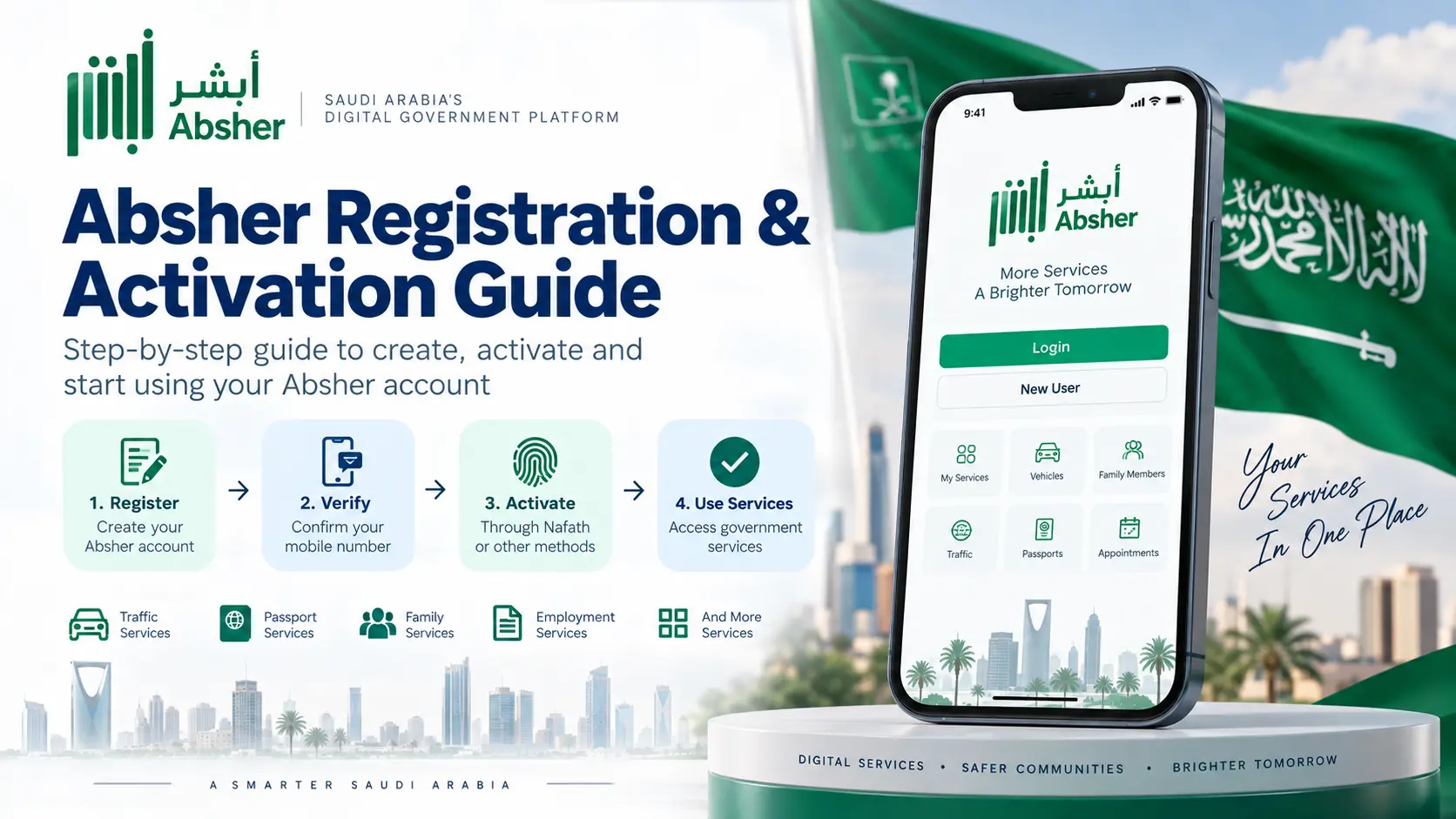
How Absher Registration Works
Registration and activation are separate parts of getting started with Absher.
The first step is to register your information through the official Absher platform. During registration, you create your username and password and verify the mobile number connected to your registration.
After registration, you need to activate your account. Absher provides more than one official activation method. This guide explains the Nafath method in detail and also lists the other official channels.
The exact screens and options inside Absher and Nafath can change when the official apps or websites are updated. If the option shown on your screen is different, follow the current instructions displayed by the official service.
Before You Register
Keep the required information ready before starting.
Iqama or ID information
Use your own identification information as requested by the official Absher registration form.
Mobile number
Enter the mobile number requested by the registration form. A verification code is sent during registration.
Email address
Keep an email address ready if it is requested during the registration process.
Your own information
Register using your own identity and mobile information. Do not use another person’s identity details.
If the mobile number entered during registration is not accepted by Absher, registration may not continue. Make sure you use the number required by the official service and check the current Absher instructions if you receive an error.
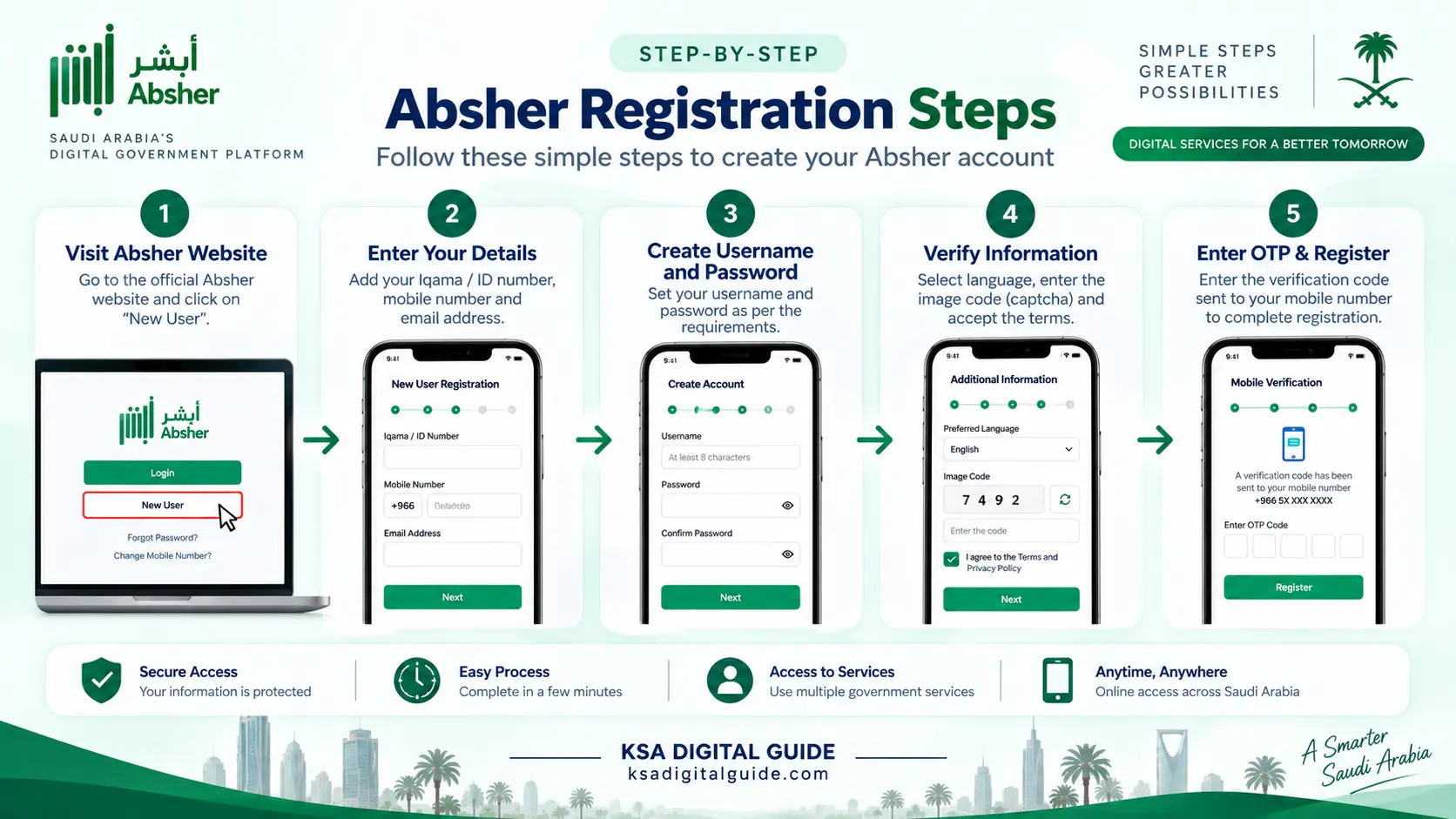
How to Register a New Absher Account
Follow the registration process shown on the official Absher website.
Open the official Absher website
Open the official Absher website and go to the login page. Choose the option for a New User.
Enter your identification details
Enter the identification information requested by the registration form, such as your Iqama, ID or other accepted identification number.
Enter your mobile number
Enter the mobile number requested by Absher. This number is used during the registration verification process.
Enter your email address
Enter your email address if requested by the registration form.
Create your username and password
Create the username and password required by the Absher registration form. Follow the password and username rules displayed on the official page.
Select your language and enter the image code
Select the available language option and enter the image verification code shown on the screen.
Accept the terms and continue
Review the displayed terms and privacy information, accept the required agreement and continue with registration.
Enter the OTP
Absher sends a verification code to the mobile number entered during registration. Enter the OTP shown in the verification message.
Complete registration
After the verification step is accepted, complete the registration process and follow the message shown by Absher.
How to Activate Your Absher Account
Absher provides several official activation channels. Nafath is one of the available methods.
Registration and activation are not the same step. After registering your account, you need to complete the activation process before using electronic services that require an activated account.
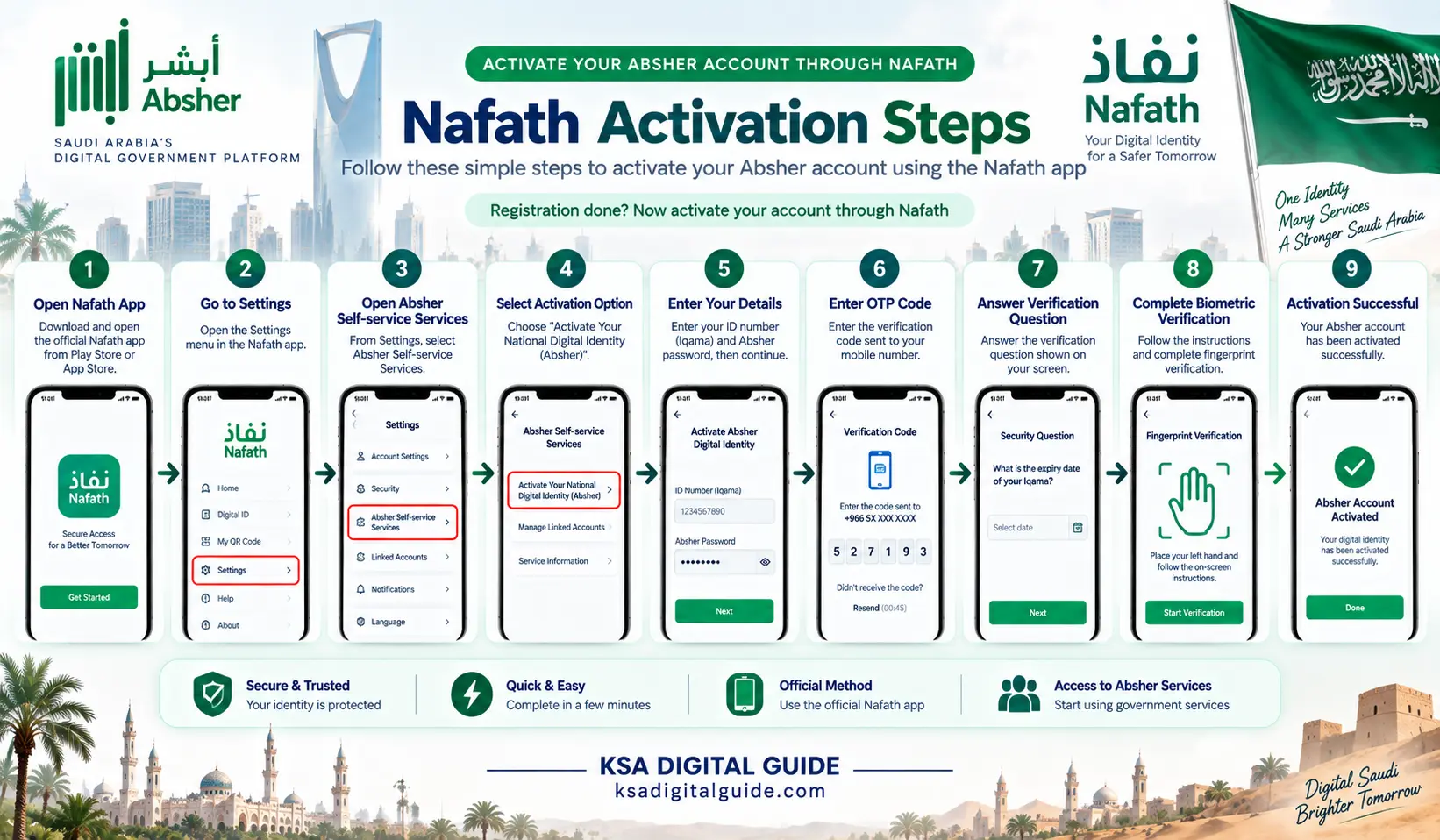
Activation Through Nafath
The current Nafath activation flow for Absher uses the Nafath app’s Absher self-service section. The steps below explain this activation method.
Open the official Nafath app
Open the official Nafath application on your mobile device.
Open Settings
From the Nafath app, open Settings.
Open Absher Self-service Services
Select Absher Self-service Services and then choose Activate Your National Digital Identity (Absher).
Enter your Absher details
Enter your identification number and the password you created for your Absher account, then continue.
Enter the OTP
Enter the verification code sent to the mobile number registered with your Absher account.
Answer the verification question
Follow the verification step shown by Nafath and answer the verification question when it appears.
Follow the biometric instructions
Nafath will display instructions for completing biometric verification. Follow the instructions shown on your phone.
Complete fingerprint verification
Follow the fingerprint capture instructions shown in Nafath. Keep your fingers clearly visible and follow the camera and hand-position instructions displayed by the app.
Check the activation confirmation
After successful verification, Nafath will display a confirmation that the digital identity activation process has been completed.
Some videos may tell users to wait a specific number of minutes after activation. We do not recommend presenting a fixed waiting time as a universal Absher rule. If you cannot log in after activation, check the activation confirmation and follow the current instructions shown by Absher or Nafath.
Other Official Absher Activation Methods
Nafath is not the only activation channel.
Absher currently provides several ways to activate an account. The available options can depend on the user’s situation and the current service requirements.
Nafath App
Use the Absher self-service activation option inside the official Nafath application and complete the identity verification steps.
Saudi Banks
Absher provides activation through supported Saudi bank channels. The exact process can differ by bank.
Absher Self-Service Kiosks
Account activation is also available through supported Absher self-service machines.
Passport & Civil Affairs Offices
Absher lists activation support through relevant Passport and Civil Affairs activation channels.
If Nafath activation is available for your situation, you can use the official app. If it does not work, check the other activation channels listed by Absher.
What to Do After Activation
Once your account has been successfully activated, you can move on to using Absher.
Log In
Open the official Absher website or app and sign in using the login details associated with your account.
Verify Your Account
Complete any OTP or identity verification requested during login.
Use Available Services
After login, use the Absher services available for your account and eligibility.
Not every Absher service is available to every user. Service availability can depend on your status, eligibility and the requirements of the individual service.
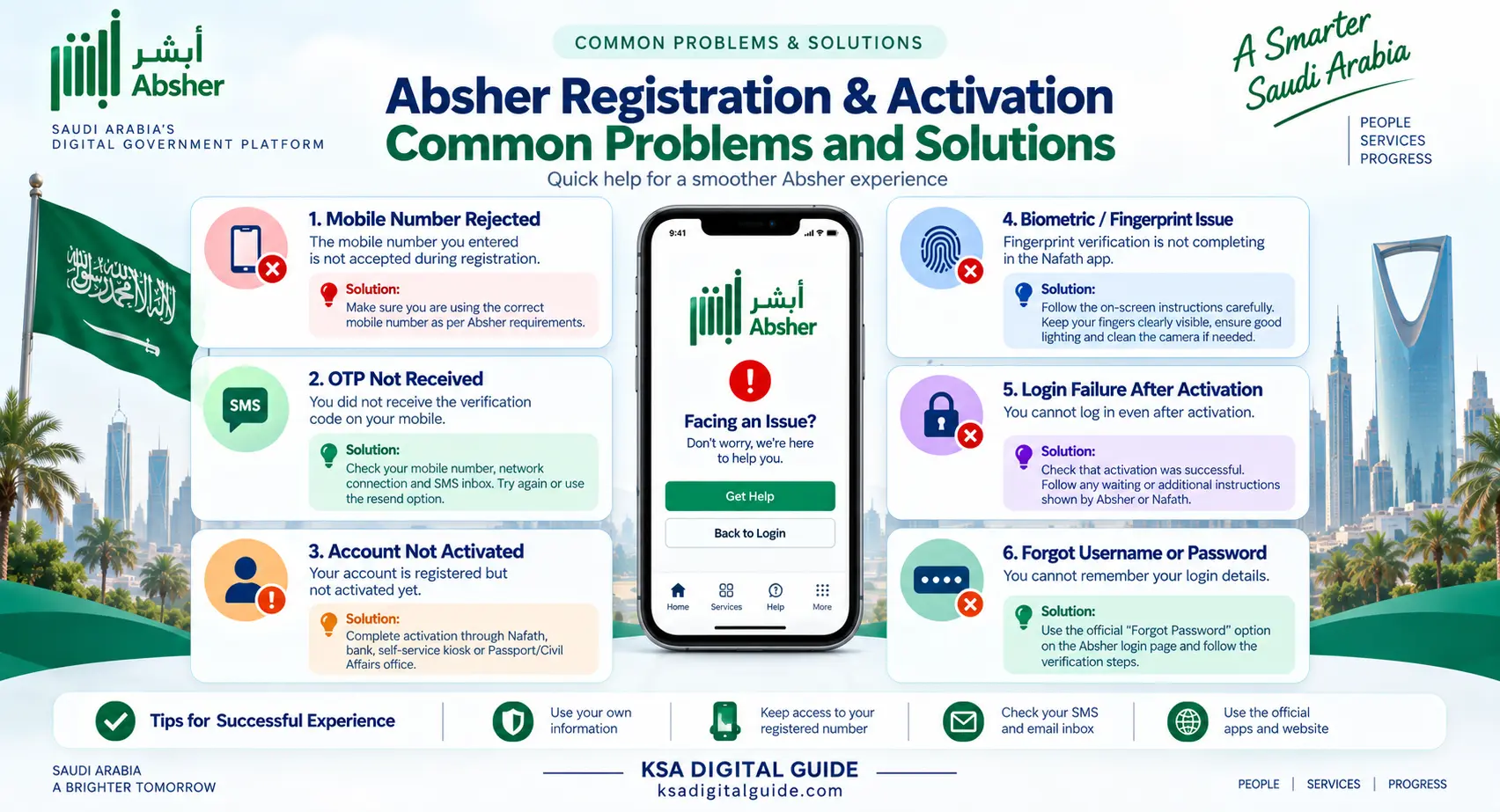
Common Registration & Activation Problems
Here are common issues to check before trying again.
Mobile number is rejected
Check the mobile number entered during registration and make sure it meets the current Absher requirements.
OTP does not arrive
Check the registered mobile number, network connection and messages on your phone. If available, use the resend option shown on the screen.
Account is not activated
Registration and activation are separate stages. Complete activation through Nafath or another official activation channel supported by Absher.
Fingerprint verification fails
Follow the hand and camera instructions displayed by Nafath. Make sure your fingers are clearly visible and the camera is clean.
Cannot log in after activation
Check whether activation was completed successfully. Then verify your username, password and any OTP requested during login.
Forgot username or password
Use the official account recovery options available from the Absher login page and follow the verification steps shown there.
Related Guides
Continue with another guide if you need help after registration or activation.
Absher Registration & Activation FAQ
Simple answers to common questions.
How do I register for Absher?
Open the official Absher website, choose New User, enter the requested identification and contact information, create your username and password, and complete the OTP verification step.
Is registration the same as activation?
No. Registration creates your Absher account. Activation is a separate step required before using services that require an activated account.
Can I activate Absher through Nafath?
Yes. Absher provides an activation method through the Nafath app’s Absher self-service section.
Does Absher activation only work through Nafath?
No. Absher lists several activation channels, including Nafath, supported Saudi banks, self-service kiosks and relevant Passport or Civil Affairs channels.
Does Nafath activation use biometric verification?
Yes. The documented Absher digital identity activation flow in Nafath includes biometric verification and fingerprint capture.
Do I have to wait exactly 10 minutes after activation?
We do not recommend treating 10 minutes as a universal official waiting rule. If you cannot log in after activation, check the activation confirmation and follow the current instructions from Absher or Nafath.
What if my Absher registration fails?
Check the information you entered, especially the identification and mobile number details. If the problem continues, check the official Absher support information rather than relying on an unofficial workaround.
Is KSA Digital Guide the official Absher website?
No. KSA Digital Guide is an independent information website. Account registration, activation and government transactions should be completed through official Saudi government platforms.
Use the Official Absher & Nafath Services
Service screens, requirements and activation options can change. Always use the official platforms when registering or activating your account.
Your Absher Account Is Ready
After registration and successful activation, you can sign in and explore the Absher services available for your account.
Go to Absher Login Guide →