
Digital Iqama & Digital ID in Absher
How to Access Your Digital Iqama
You can access digital identity services through the Absher platform. Digital ID services make it easier to access your identity information through official Saudi digital services.
Open Absher
Open the official Absher website or Absher app and log in to your account.
Open Digital ID
Use the Digital ID or digital identity option available in your Absher account.
Select Your Digital Identity
Select the digital identity document available for your account.
View Your Information
Your available digital identity information will appear on the screen.
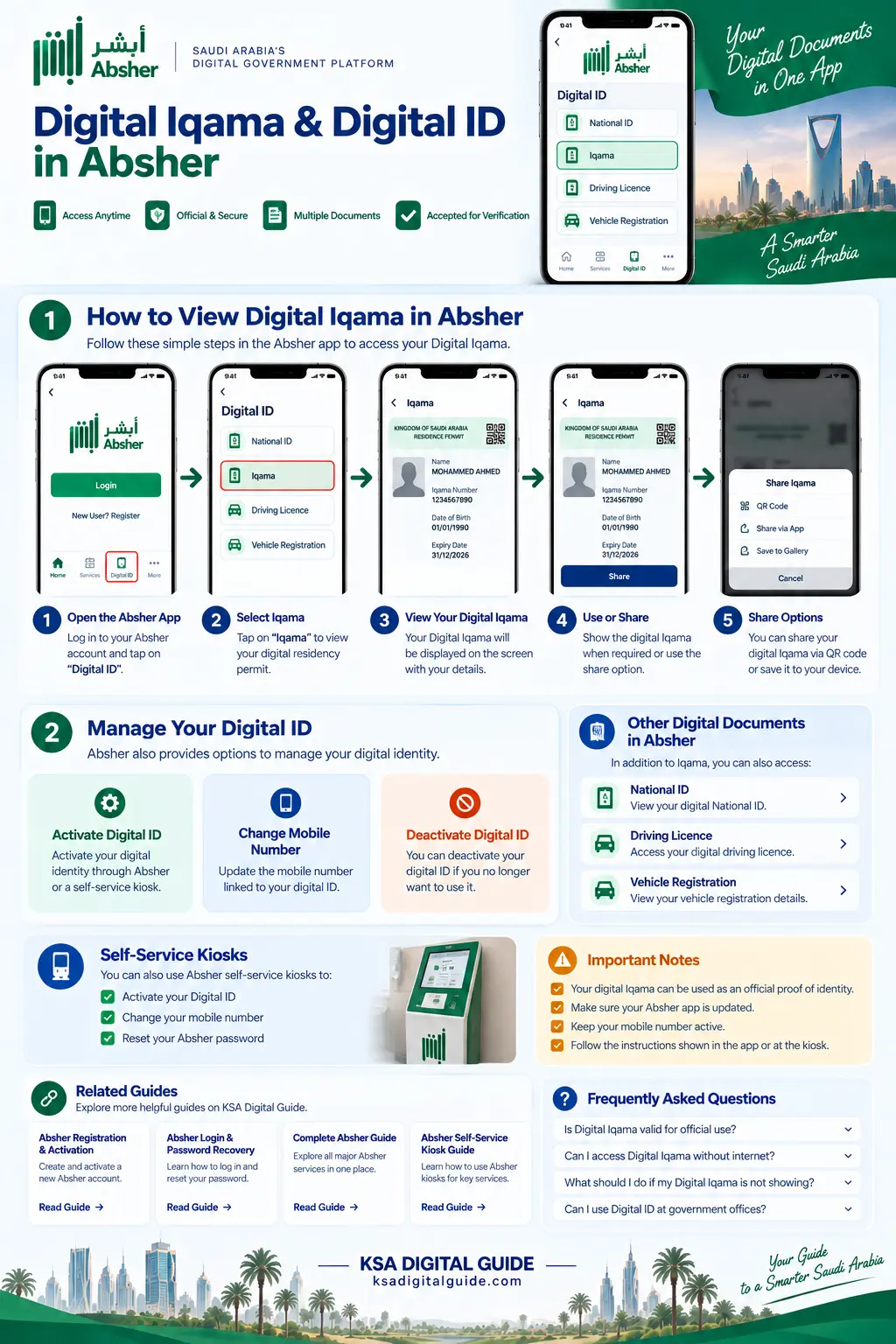
Digital Iqama and Digital ID guide for Absher users.
Important: Absher app screens and menu names can change after updates. Always follow the options currently shown in your official Absher account.
What Is Digital Iqama?
Digital Iqama is a digital way to access your residency identity information through supported Saudi digital services.
It makes your identity information easier to access through digital platforms without depending only on the physical Iqama document.
Residents in Saudi Arabia can view and present their digital Iqama and its details when requested by relevant authorities within the Kingdom.
Digital ID Management in Absher
Absher provides several Digital ID management services.
Activate Digital ID
Activate your Digital ID through an available official activation channel.
Change Mobile Number
Absher provides a Digital ID management option for changing your registered mobile number.
Deactivate Digital ID
The Absher app provides an option to deactivate the Digital ID.
These Digital ID management options are listed among Absher’s current official services.
How to Activate Your Digital ID
If your Digital ID is not active, Absher provides several official activation channels.
Absher App
The official Absher app provides Digital ID management and activation options.
Self-Service Kiosk
Digital ID activation and other listed services are available through supported Absher self-service kiosks.
Saudi Banks
Absher lists Digital ID activation through supported Saudi bank channels.
Passports & Civil Affairs
Activation officers at Passports and Civil Affairs offices provide listed Digital ID services after identity verification.
If you are a new Absher user, first complete our Absher Registration & Activation Guide .
Digital ID Activation Through Nafath
Absher provides an official process for activating the digital identity originating from Absher through the Nafath app.
Open Nafath
Open the official Nafath app and go to Settings.
Select Absher Digital Identity
Select the option for activating the digital identity originating from Absher.
Enter Absher Details
Enter your ID number and Absher password when requested.
Complete Verification
Follow the verification and biometric instructions shown in the official Nafath app.
The official Absher instructions describe a validation question and biometric fingerprint verification during this activation process.
Digital ID Services at Self-Service Kiosks
Absher lists Digital ID services through its supported self-service kiosks.
Activate Digital ID
Activate the Digital ID through the available kiosk service.
Change Mobile Number
Change your mobile number through the listed kiosk service.
Reset Password
Supported kiosks also provide a password reset service.
Digital Iqama Is Not Showing
Try these basic checks first.
Check Your Account
Make sure you are logged in to the correct Absher account.
Check Digital ID Status
If the Digital ID is not active, complete an available official activation method.
Check Mobile Number
If your mobile number has changed, use the official Digital ID mobile-number management option.
Check for App Updates
Make sure you are using the latest available version of the official Absher app.
Security: Never share your Absher password, OTP or other verification codes with another person.
For more account and login problems, see our Saudi Digital Services Troubleshooting Guide .
Digital Iqama vs Physical Iqama
Digital Iqama
- Available through supported digital services.
- Easy to access through your digital account.
- Useful for viewing your digital identity information.
Physical Iqama
- Remains your physical residency document.
- Keep it safe and follow official requirements.
- Do not assume every situation accepts the same form of identification.
Related Guides
Digital Iqama & Digital ID FAQ
What is Digital Iqama?
Digital Iqama is a digital way to access your residency identity information through supported Saudi digital services.
How can I access my Digital Iqama?
Log in to your official Absher account and use the available Digital ID or digital identity options.
Can I activate Digital ID through Nafath?
Yes. Absher provides an official process for activating the digital identity originating from Absher through the Nafath app.
Can I change my mobile number?
Yes. Absher currently lists Change Mobile Number as one of its Digital ID management services.
What if my Digital ID is not active?
Use one of the official activation channels listed by Absher, such as the Absher app, supported self-service kiosks, Saudi banks or activation officers.
Official Source: For the latest instructions and available services, always check the official Absher website .
Need More Absher Help?
Explore our simple Absher guides for registration, login, Digital ID, Nafath and other Saudi digital services.
Explore Absher Guides →