
Qiwa Registration & Login Guide
Qiwa registration is the starting point for accessing your individual Qiwa account and related digital employment services. This guide explains how to create or access your Qiwa account, complete identity verification and log in successfully.
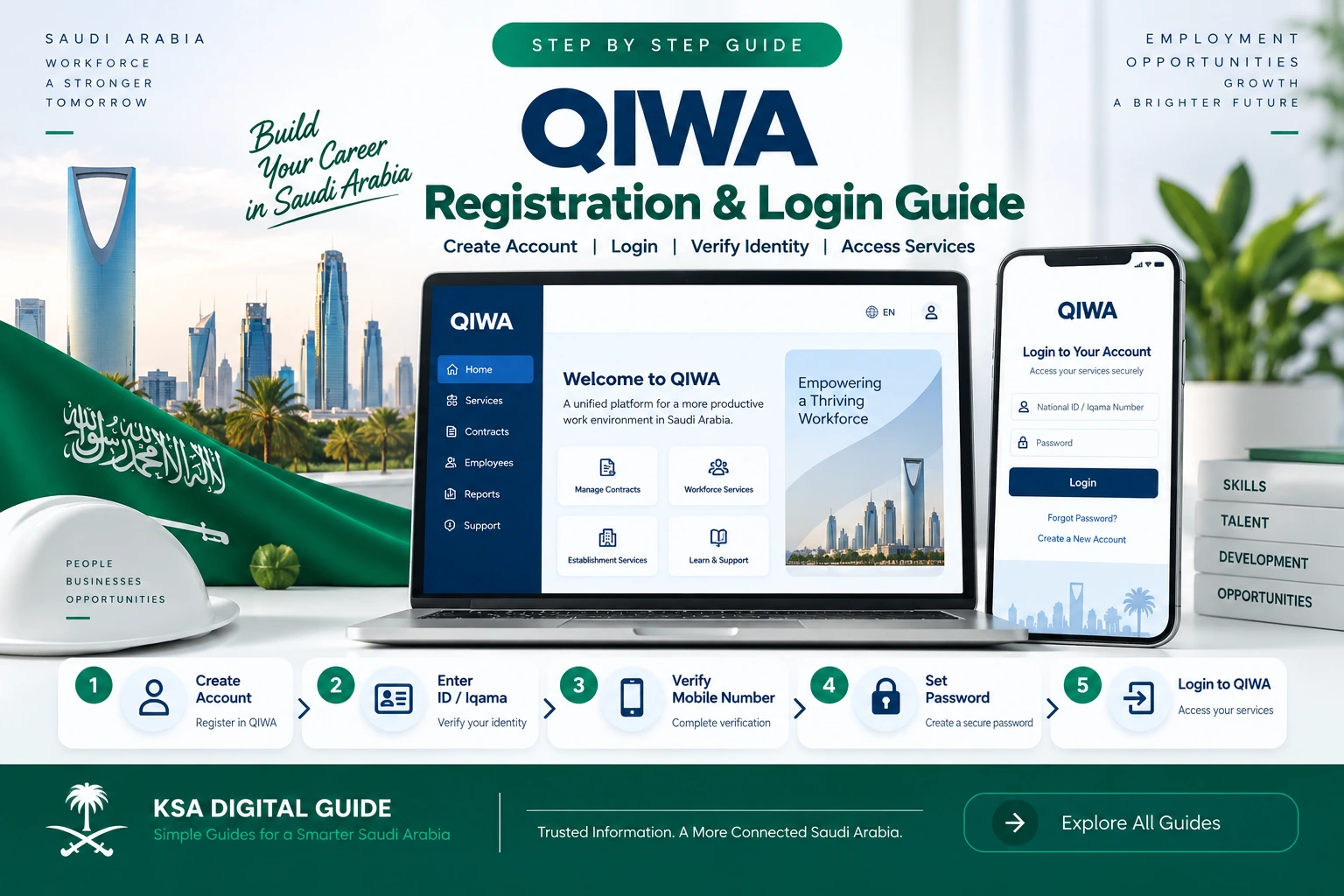
Create Your Account
Start from the official Qiwa registration route and follow the identity verification and account setup instructions shown on screen.
Verify Your Identity
Qiwa uses identity verification as part of account access and registration. Complete the verification requested by the platform.
Access Qiwa Services
After signing in, your available individual or workspace services depend on your account and permissions.
What You Will Learn
What Is Qiwa?
Qiwa is a digital platform used for Saudi workforce and employment services. It provides digital access to different labor-related services for individuals and establishments.
Qiwa is also used as an account and workspace environment for related services. Current Qiwa-linked service documentation explains that users can have individual and company workspaces through their Qiwa profile.
How Qiwa Registration Works
If you do not already have a Qiwa account, start from the official Qiwa registration page. The platform will guide you through the identity and account setup process.
Open the Official Qiwa Website
Open the official Qiwa website and choose the registration option for a new account.
Start Account Registration
Select the registration option and enter the identity information requested by the current Qiwa registration page.
Complete Identity Verification
Follow the identity verification instructions displayed by Qiwa. Depending on the current authentication flow, you may be directed to an approved Saudi digital identity verification method.
Add Your Account Information
Complete the contact and account information requested by Qiwa during registration.
Complete Verification
If Qiwa sends a verification code or asks you to confirm an account detail, complete that step before continuing.
Open Your Qiwa Account
After successful registration, sign in to your Qiwa account and review the services and workspace options available to you.
How to Log In to Qiwa
Once your Qiwa account has been created, you can use the official Qiwa login page whenever you need to access your account.
Open Qiwa
Go to the official Qiwa website and open the sign-in option.
Enter Your Account Details
Enter the login information requested by the current Qiwa sign-in page.
Complete Authentication
If Qiwa asks you to complete an additional identity or verification step, follow the instructions displayed on screen.
Open Your Dashboard
After successful authentication, Qiwa will open the account or workspace available to you.
Qiwa Login and Identity Verification
Qiwa uses secure identity and authentication processes to protect access to digital workforce services. Some Qiwa services may use Saudi digital identity authentication as part of the sign-in process.
If the login page shows an identity-verification option, use the authentication method displayed by Qiwa and complete the request on your authorized device.
What You Can Do After Qiwa Login
The services available after Qiwa login depend on your account type, workspace and permissions. Qiwa-linked services can provide access to different workforce and employment functions.
Individual Services
Individual users can access the Qiwa services available to their profile and employment situation.
Employment Services
Qiwa provides digital employment and workforce services, including services related to employment contracts and other labor processes.
Company Workspaces
Authorized users can access company workspaces when they have the required permissions.
Common Qiwa Registration & Login Problems
Forgot Your Qiwa Password?
If you cannot remember your Qiwa password, use the password-recovery option available on the current official Qiwa login page.
Open the Qiwa Login Page
Start from the official Qiwa website.
Select Password Recovery
Choose the password recovery option displayed by the current login page.
Complete Verification
Follow the identity or verification steps shown by Qiwa.
Create Your New Password
Follow the password requirements displayed by Qiwa and save the new password.
Qiwa Account Security Tips
Qiwa Registration & Login FAQ
How do I register for Qiwa?
Open the official Qiwa website, select the registration option and complete the identity verification and account setup steps shown by the current Qiwa registration page.
How do I log in to Qiwa?
Open the official Qiwa website, select the login option, enter the information requested by the current sign-in page and complete any additional authentication step.
Can I use Qiwa as an individual?
Yes. Qiwa provides individual account access, and Qiwa-linked documentation describes individual workspaces alongside company workspaces.
Why can I not see a Qiwa service?
Available services can depend on your account type, workspace, permissions and eligibility for the service.
What should I do if I forget my Qiwa password?
Use the password-recovery option available on the official Qiwa login page and complete the verification steps shown by Qiwa.
Is Qiwa connected with other Saudi digital services?
Qiwa provides digital access to workforce services and can use approved identity and authentication methods for secure account access.
Is Qiwa only for companies?
No. Qiwa supports individual users as well as company workspaces. The services available depend on the user’s account and permissions.
Related Qiwa & Work Guides
Official Sources
Qiwa procedures and login screens can change. Use the official Qiwa platform for the current registration and login process.
Visit official Qiwa
View Qiwa registration and login guide
View Qiwa individual account information
Need More Saudi Work Service Guides?
KSA Digital Guide explains Saudi digital services in simple English, including Qiwa, Muqeem, Absher, Nafath, Iqama and employment services.
Explore KSA Digital Guide